What is hreflang?
Hreflang is an attribute that marks a page’s language and, optionally, its country. Google uses it to show searchers the version of a page meant for them, for example the UK pricing page to someone searching in the UK.
A hreflang tag looks like this:
<link rel=”alternate” hreflang=”en-GB” href=”https://example.com/uk/pricing/” />
en is the language (English) and GB is the country (United Kingdom). The address is the full URL of that version.
Not sure about a term? My SEO glossary explains hreflang, x-default and canonical tags in plain English.
Do you need hreflang?
You need hreflang if you have more than one version of the same page for different languages or countries. Common cases:
- An English site with separate UK, US and Australian pages
- A site in English and Arabic for the UAE
- A Canadian site in English and French
You don’t need it if your site has one version of each page for everyone, even if you sell internationally. Hreflang links versions together. With only one version, there’s nothing to link.
Still deciding how to structure your country pages (subfolders, subdomains or country domains)? Start with my international SEO strategy guide, then come back here.
Google’s hreflang rules in plain English
These come from Google’s own documentation, updated in September 2026.
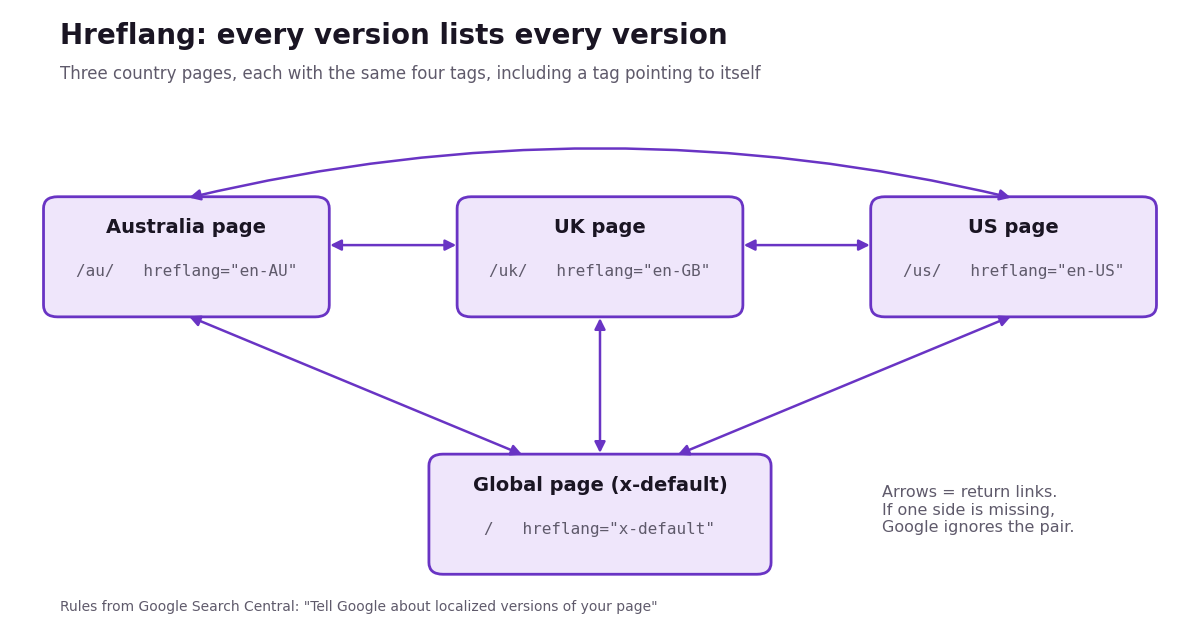
- Every version lists every version, including itself. A page with three country versions carries all three tags, plus x-default if you use it.
- Links must go both ways. Google says that if two pages don’t both point to each other, the tags are ignored.
- Use the right codes. Language from ISO 639-1 (en, fr, ar), then optionally a country from ISO 3166-1 Alpha 2 (GB, US, AU, AE, CA). A country on its own, like hreflang=”GB”, doesn’t work.
- The UK is GB, not UK. Google states that UK and EU have no effect in hreflang. en-UK is one of the most common mistakes I find.
- Use full URLs, including https://.
- Add x-default for everyone else. It’s the page shown when no version matches, usually a global page or a country selector.
- Pick one method. Hreflang can go in the page’s HTML, the HTTP header or the XML sitemap. Google treats them the same and says there’s no benefit to using more than one.
Hreflang return links diagram
A complete hreflang example
Here’s the full set for one page that exists in three English-speaking countries, plus a global fallback. The same four lines go on all four pages.
<link rel=”alternate” hreflang=”en-AU” href=”https://example.com/au/seo-services/” />
<link rel=”alternate” hreflang=”en-GB” href=”https://example.com/uk/seo-services/” />
<link rel=”alternate” hreflang=”en-US” href=”https://example.com/us/seo-services/” />
<link rel=”alternate” hreflang=”x-default” href=”https://example.com/seo-services/” />
Each page ends up linking to itself and to the others, which covers both the self-reference rule and the return-link rule.
3 ways to add hreflang in WordPress
| Method | Best for | Adds tags automatically? | Effort |
| Multilingual plugin (WPML, Polylang, TranslatePress) | Sites translated into other languages | Yes, for linked translations | Low once set up |
| Hreflang plugin (for example Hreflang Manager) | Same-language country pages (/uk/, /us/, /au/) with no translation plugin | You connect the pages yourself | Medium |
| Manual code in the theme | Very small sites with a developer | No | High, and easy to break |
Option 1: A multilingual plugin (WPML or Polylang)
If you translate your site, your translation plugin should handle hreflang for you.
- WPML adds hreflang tags automatically and updates them as you change pages. To target a country, go to WPML → Settings → Languages, click Edit on the language and put the full code (for example en-GB) in its hreflang WPML doesn’t warn you about invalid codes, so check them against the list above.
- Polylang also adds hreflang automatically, based on each language’s WordPress locale (en_GB becomes en-GB). By default it only adds x-default on the homepage. Other pages need a small code snippet from Polylang’s documentation.
Option 2: A hreflang plugin (for same-language country pages)
Many service businesses don’t translate anything. They have English pages for different countries, such as /uk/seo-services/ and /au/seo-services/. A translation plugin is overkill here.
A dedicated plugin such as Hreflang Manager (free on WordPress.org) lets you connect the matching pages and choose the language and country code for each. You set up each group of pages once, and the plugin adds the tags to every page in the group.
Option 3: Add the code by hand
You can paste the <link> lines into your theme’s header.php or add them with a code snippets plugin. I don’t recommend it for most sites. Every new page needs new tags on every version, and one missed return link breaks the pair. If you do it, use a child theme so a theme update doesn’t wipe your changes.
Does Rank Math or Yoast add hreflang?
No. Rank Math and Yoast don’t create hreflang tags on their own. They handle titles, meta descriptions, schema and sitemaps, and they work alongside a multilingual plugin such as WPML or Polylang, which adds the hreflang. If you only have Rank Math or Yoast, use Option 2 or 3 above.
The 6 hreflang mistakes I see most
- en-UK instead of en-GB. Google ignores it.
- Missing return links. The UK page points to the US page, but the US page doesn’t point back.
- No self-reference. Each page must list itself.
- Pointing at the wrong page: a redirected URL, a noindexed page or the homepage instead of the matching page.
- Canonical tags that fight hreflang. If the UK page’s canonical points to the US page, you’re telling Google the UK page is a duplicate. Each version should normally have a canonical pointing to itself.
- Forcing visitors by IP address. If your site automatically redirects by location, Google’s crawler (which mostly crawls from the US) may never see your other versions. Show a country banner or selector instead, and let people choose.
How to check your hreflang works
- Look at the page source. Open a page, right-click → View page source, press Ctrl + F and search for hreflang. You should see one line per version, including the page itself.
- Check the other versions. Open each linked URL and confirm it lists the same set. This is how you catch missing return links.
- Check the codes. Every code should be a valid language, optionally followed by a valid country (en-GB, not en-UK or GB).
- Run a crawler for bigger sites. Screaming Frog’s SEO Spider has a hreflang report, and the site audits in Semrush and Ahrefs flag hreflang errors.
- Watch Search Console by country. After a few weeks, filter Performance → Country to see whether each market now gets its own pages in the results.
Frequently asked questions
Q1. What is hreflang used for?
Hreflang tells Google which version of a page is meant for which language or country. Google uses it to show searchers the right version, for example the Australian page to someone searching in Australia.
Q2. How do I add hreflang in WordPress?
Use a multilingual plugin such as WPML or Polylang if you translate your site, because they add hreflang automatically. For same-language country pages without translation, use a hreflang plugin such as Hreflang Manager. Adding the code by hand works but is hard to maintain.
Q3. Does Rank Math add hreflang tags?
No. Rank Math and Yoast don’t create hreflang tags themselves. They work alongside multilingual plugins such as WPML and Polylang, which add the tags.
Q4. What is x-default in hreflang?
x-default marks the page to show when none of your language or country versions matches the searcher. It’s usually a global page or a page where visitors choose their country.
Q5. Is it en-UK or en-GB?
It’s en-GB. Hreflang uses ISO country codes, and the code for the United Kingdom is GB. Google says UK has no effect in hreflang.
Need help with hreflang or international SEO?
If your site serves several countries and you’re not sure your hreflang is right, I can check it and fix the setup with you. I work with businesses in the UAE, Australia, the US, Canada and the UK on international SEO, from hreflang and site structure to country keyword research.